






























































DNS Backup
DNS Backup is a powerful and genuinely useful feature that is unique to Hipposerve.
Our systems automatically take a backup of your DNS every day and retain copies for the last 7 days. This allows you to quickly recover from accidental changes, misconfiguration, or unexpected DNS issues.
In addition to automatic backups, you can also create DNS backups manually — which is strongly recommended before making planned changes to your DNS. This helps safeguard your websites, email, and other online services.
Hipposerve offers two different DNS backup methods, each suited to different use cases. This guide explains both so you can choose the correct option.
DNS Backup Methods Overview
Method 1: Complete DNS Backup
This method creates a full backup of the DNS records for all domains on your account.
When you initiate a manual DNS backup, a background task is created and the backup is stored securely within your Hippo Portal.
You can view historical DNS records and restore them at any time.
Advantages:
- Ideal for disaster recovery
- Backs up all domains automatically
- No files to manage or download
Limitations:
- The task can take time to complete (up to 1 hour for large DNS zones)
- All domains are backed up together
- Restore is “all or nothing” — individual domains cannot be restored separately
- The backup cannot be used with third-party DNS providers
Method 2: Export DNS Zone (BIND File)
This method exports the DNS records for a single domain as a standard BIND-format text file.
The BIND format is widely recognised and supported by most DNS providers, making it ideal if you want to migrate or replicate your DNS elsewhere.
The export is generated instantly and downloaded directly to your device.
Advantages:
- Instant export — no waiting
- Backs up a single domain only
- Compatible with third-party DNS providers (e.g. Cloudflare)
- Allows selective restore of individual domains
Limitations:
- Manual process only
- You must safely store the file yourself
- Restores require uploading the saved BIND file
How to Create a Manual DNS Backup (All Domains)
Method 1: Complete DNS Backup
- Log in to your Hippo Portal
- Navigate to My DNS

- Click the Backups button

- Under Backup Tasks, click Create Backup
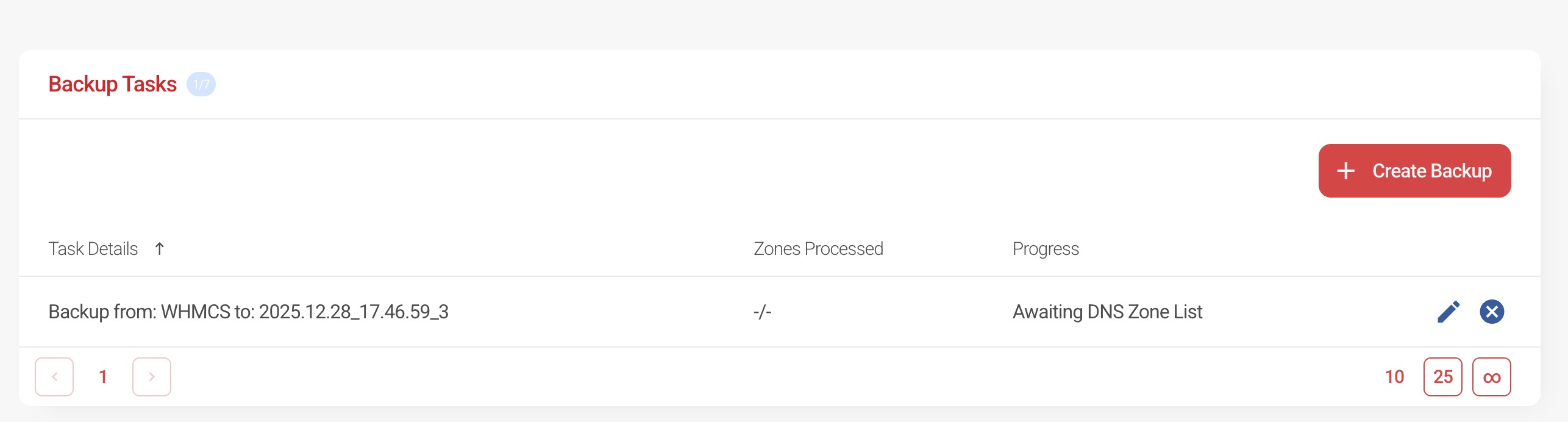
- The backup task will be generated and begin running
Please allow up to 1 hour for large DNS zones to complete.
Once finished, the backup will be available within your portal for review or restoration.
How to Export a DNS Zone (Single Domain)
Method 2: Export DNS Zone as BIND File
- Log in to your Hippo Portal
- Navigate to My DNS

- Select the domain you wish to export and click the pencil icon

- Click the three dots in the top-right corner of the DNS zone
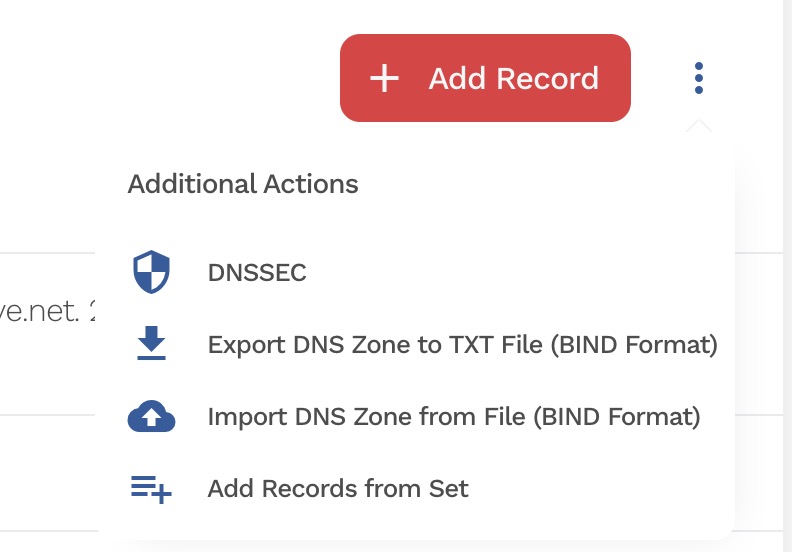
- Select Export DNS Zone to TXT File (BIND format)
- The BIND file will be downloaded to your device
Keep this file safe — it can be uploaded later to restore the DNS for that domain or imported into another DNS provider.
Which Method Should I Use?
- Use Complete DNS Backup for full-account disaster recovery
- Use DNS Zone Export when making changes to a single domain or migrating DNS elsewhere
For best practice, we recommend using a DNS export before making major changes to an individual domain, and relying on automatic backups as a safety net.